Microsoft Fabric Mirroring together with Change Data Feed (CDF)
Learn how to enable and leverage Change Data Feed (CDF) with Fabric Mirroring to build true incremental data pipelines and unlock near real-time data processing capabilities.
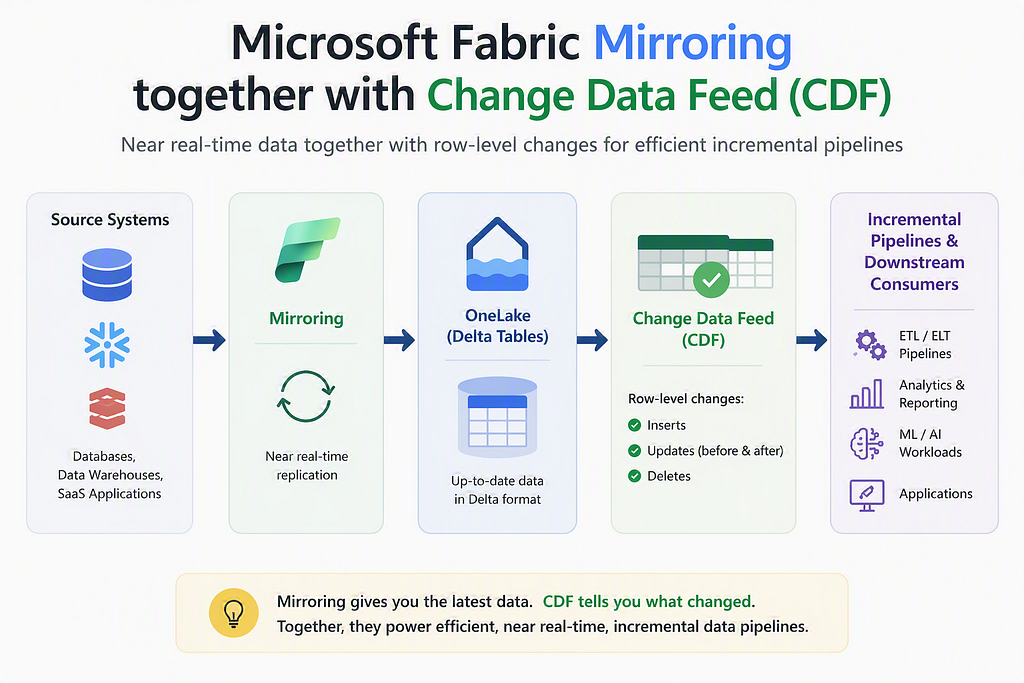
#Using Change Data Feed (CDF) with Fabric Mirroring
When working with Microsoft Fabric Mirroring, you get something very powerful out of the box:
Near real-time data replication into OneLake — without building pipelines.
But when you start building data pipelines on top of mirrored data, one question naturally comes up:
How do I process only the changes instead of reprocessing full tables?
This is where Change Data Feed (CDF) becomes highly relevant
#What Mirroring actually does
Fabric Mirroring continuously replicates your source system (like Azure SQL, Snowflake, etc.) into OneLake as Delta tables.
- Near real-time replication
- No pipelines to maintain
- Always up-to-date data
At any point in time, you get a current-state replica of your source system.
But here’s the catch:
Mirroring gives you what the data looks like now — not what changed_._
#Why CDF matters in this setup
While mirrored tables are always fresh, they don’t directly expose row-level changes.
That means:
- You don’t know which rows changed
- You can’t easily do incremental loads
- You end up reprocessing entire tables
This is where CDF unlocks the next level.
#Is CDF enabled by default?
No — it is not enabled by default. CDF in Fabric Mirroring is not part of the core mirroring experience.
It belongs to something called Extended Capabilities.
- CDF is an optional feature
- It must be explicitly enabled per mirrored database
#How to enable CDF (Extended Capabilities)
You can enable CDF in two ways:
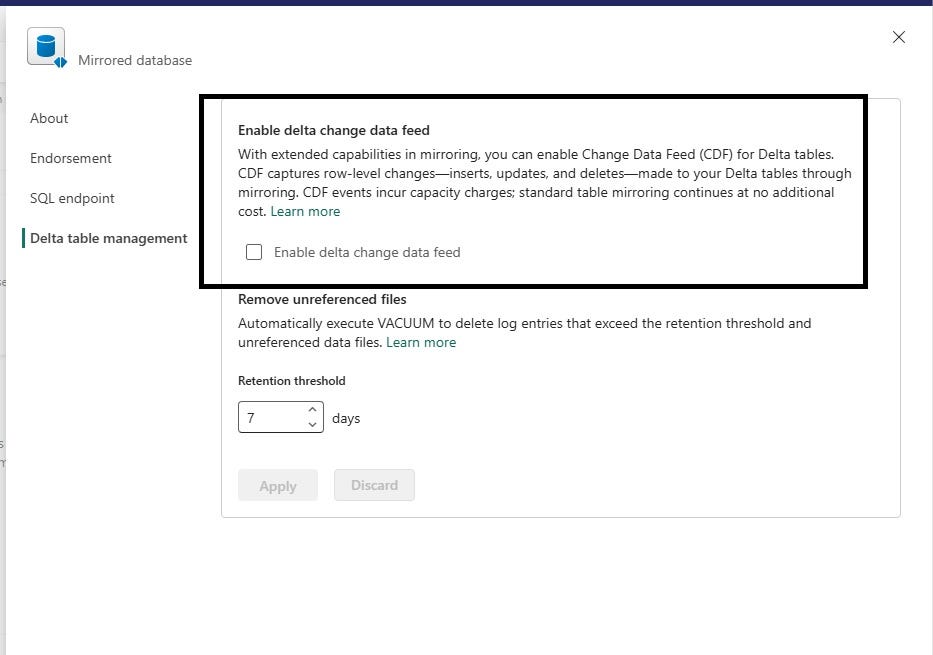
#Option 1: Fabric UI
- Go to mirrored database settings
- Open configuration
- Enable “Delta Change Data Feed”
#Option 2: Using API
You can enable it programmatically:
PATCH /mirroredDatabases/{databaseId}{ "properties": { "extendedCapabilities": { "deltaChangeDataFeedEnabled": true } }}
#Pricing
Extended capabilities are not free.
Key points from Microsoft:
- Core mirroring → no compute cost for replication
- Extended capabilities → billable feature [learn.microsoft.com]
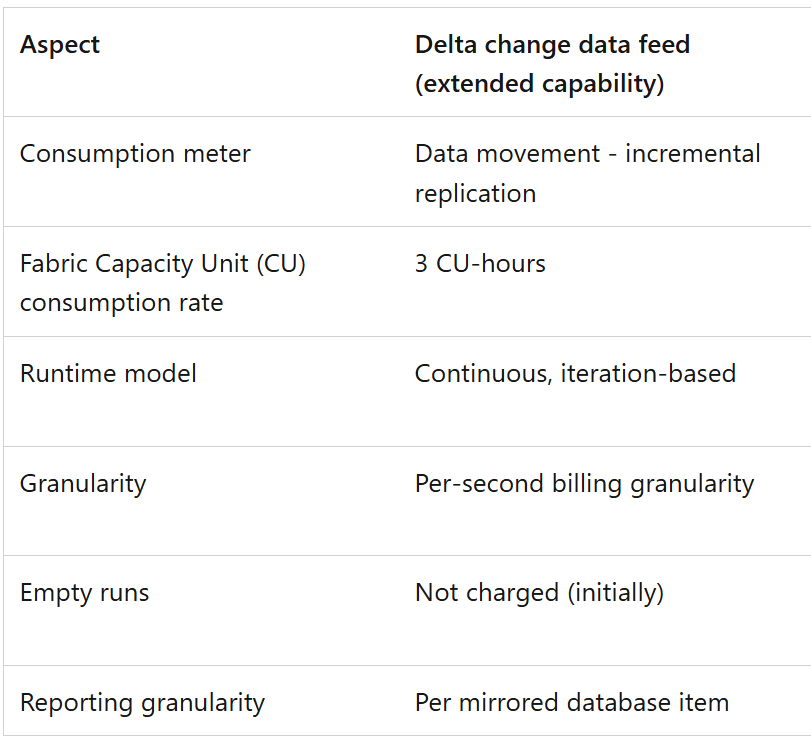
For full details, refer to:
#What you unlock with Mirroring + CDF
#1. True incremental pipelines
Instead of scanning full tables:
SELECT * FROM table_changes('table_name', start_version)
You process only what changed.
#2. Near real-time data processing
Mirroring + CDF forms a powerful combination:
- Mirroring → keeps data fresh near real time
- CDF → exposes granular changes
#3. Efficient data modeling
CDF provides change context like Pre-image (before update) and Post-image (after update) which makes it much easier to implement:
- SCD Type 2
- Delta merge patterns
If you’re interested in a hands-on implementation of CDF-driven pipelines, I’ve covered this in detail here:
#Important things to consider
#CDF only captures changes after enablement
If you enable CDF later, past changes are not available.
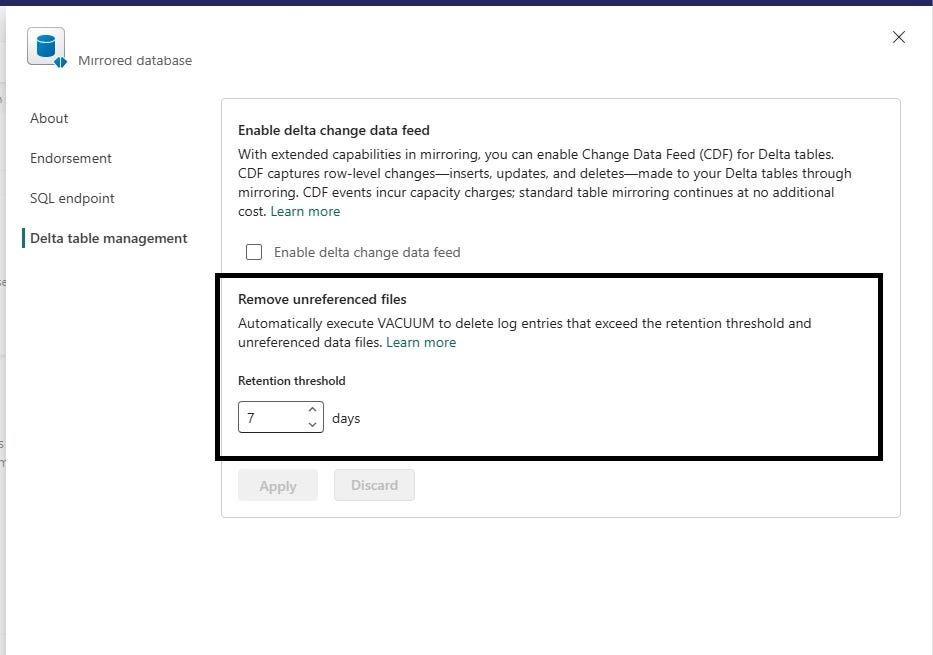
#Retention matters
Change data is not stored forever.
- It depends on Delta retention policies
- Old data can be removed over time
- Running VACUUM removes old data files. That also means: change data can be lost
#Preview feature
This feature is still in preview by Microsoft, which means no official support yet.
Get future articles
Follow for practical Microsoft Fabric, Azure, Spark, and data engineering writeups.