What Link to Microsoft Fabric Actually Costs: Dataverse Storage and Capacity Units
Link to Fabric has two cost components: the Delta replica held in Dataverse database storage at $48/GB/month, and the Fabric capacity that consumes it. This covers both, with measured replica-to-source size ratios from a D365 F&O sandbox, current per-GB and per-SKU rates, the pipeline maintenance the premium buys away, and the levers that reduce consumption.
Link to Fabric removes the need to provision a storage account and build an export pipeline. It does not remove the storage itself: the replica is held in Dataverse database capacity, which is billed per GB per month at a substantially higher rate than lake storage. This post covers the full cost model, measured replica ratios, and the levers that reduce consumption.
#The two cost components
Cost estimates for Link to Microsoft Fabric commonly account for Fabric capacity alone, because that is the component with a public price list. Dataverse storage consumption is the second component and is frequently omitted.
The cost model is:
- Dataverse database storage — the Delta replica of every synced table is held in Dataverse storage, billed at $48 per GB per month above a 1 GB per-environment entitlement.
- Fabric capacity (CUs) — everything you do with the data once it's in OneLake: notebooks, pipelines, SQL endpoint queries, Direct Lake semantic models.
The second component behaves like any other Fabric workload and is well documented. The first is the one worth measuring before committing to a table set — and at $48/GB/month, the one where table selection pays for itself.
#Where the replica shows up
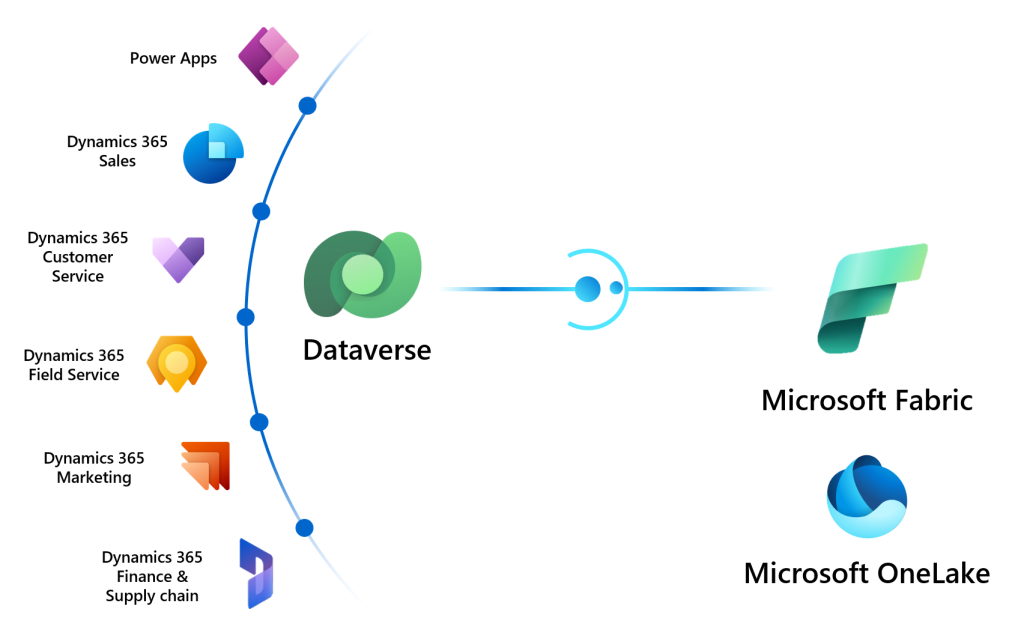
Link to Fabric doesn't copy your data into OneLake. It creates an optimised Delta Parquet replica using Dataverse storage, then exposes it to your Fabric workspace through shortcuts. The data stays governed by Dataverse and stays in the same region as the environment.
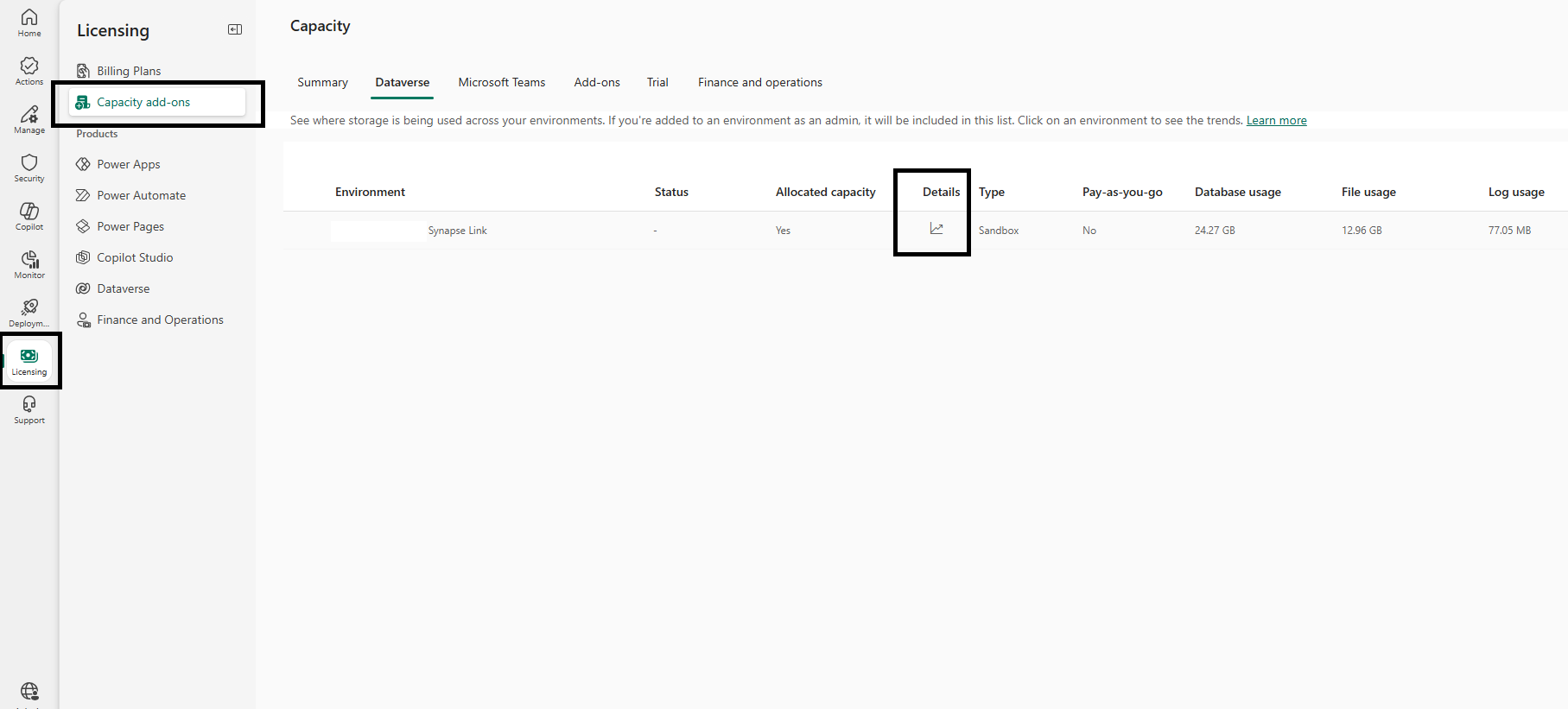
You can see exactly what it costs you. Start with the environment-level totals:
- Go to the Power Platform admin center.
- Licensing → Capacity add-ons → Dataverse tab.
- The grid gives you Database usage, File usage, and Log usage per environment. Fabric Link replicas land in Database usage.
- The Details control on the environment row opens the consumption trend, which is what you want when you're trying to spot the step change a new link introduced.
Environment totals tell you whether you have a problem. They don't tell you which tables caused it. For that there is now a per-table view:
- Licensing → Dataverse (under Products) → Environments tab.
- Scroll to Consumption per table.
- Type
Analyticsinto the search box. - Sort by Consumption, and use Download report if you want the full list rather than the page you can see.
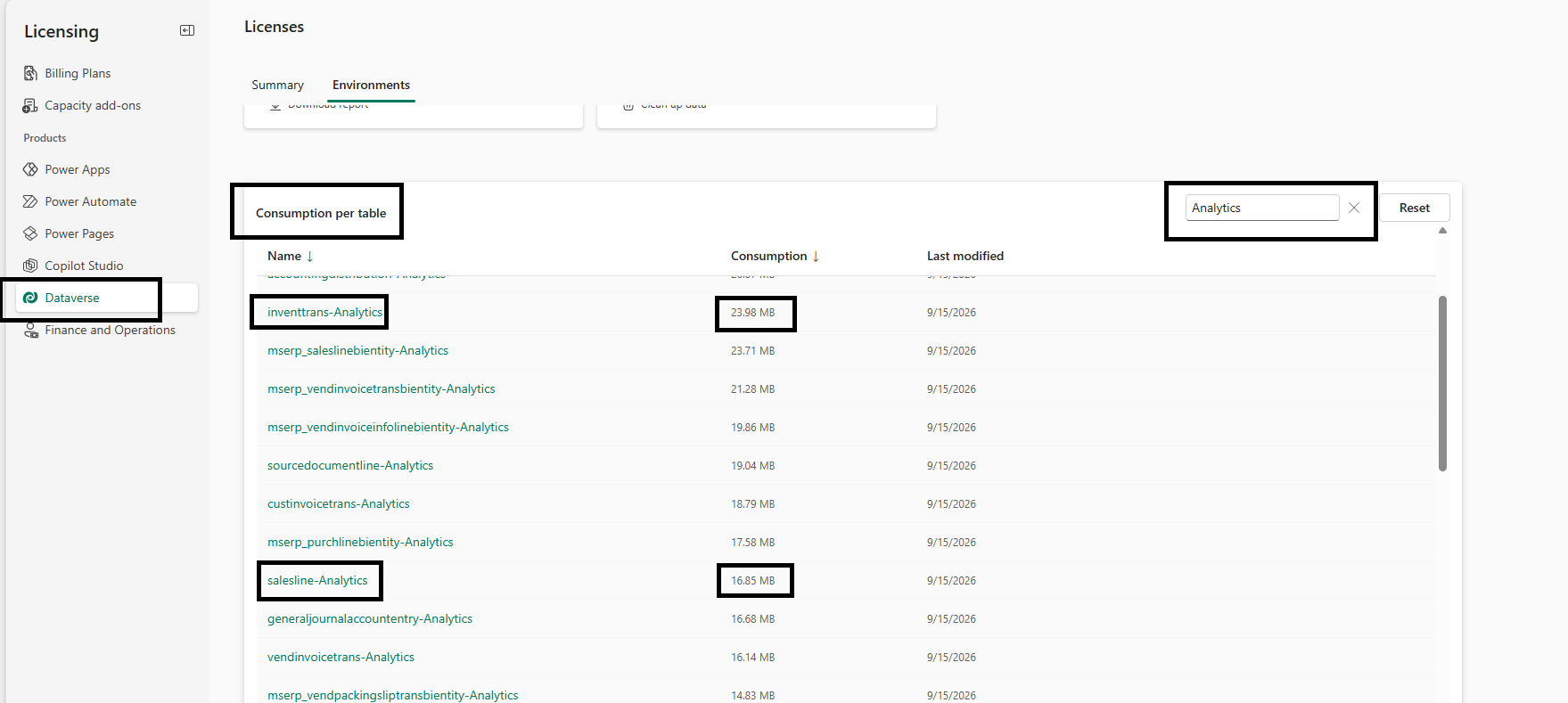
Every table with an -Analytics suffix is the Fabric Link replica. If you linked the Account table, you'll find an Account-Analytics entry alongside it. The Last modified column is useful on its own — a replica that hasn't moved in weeks is a table nobody is writing to, and often one nobody is reading either.
Microsoft's capacity documentation notes the
- Analyticssuffix is also used by Insights applications, so on an environment running Sales Insights or Field Service analytics you'll see entries that aren't from Fabric Link. Cross-reference against your linked table list rather than assuming.
#Finding the F&O source table sizes
The -Analytics figure is only half of a ratio. To size a link before you create it — or to work out which tables are actually driving replica growth — you need the source side, and for finance and operations environments that lives on a separate tab:
- Licensing → Capacity add-ons → Finance and operations tab.
- Select the environment.
- The flyout lists every F&O table with its size, sorted descending.
- Use Export to CSV for the full list; View as chart shows only the top consumers, which is insufficient for a full accounting.
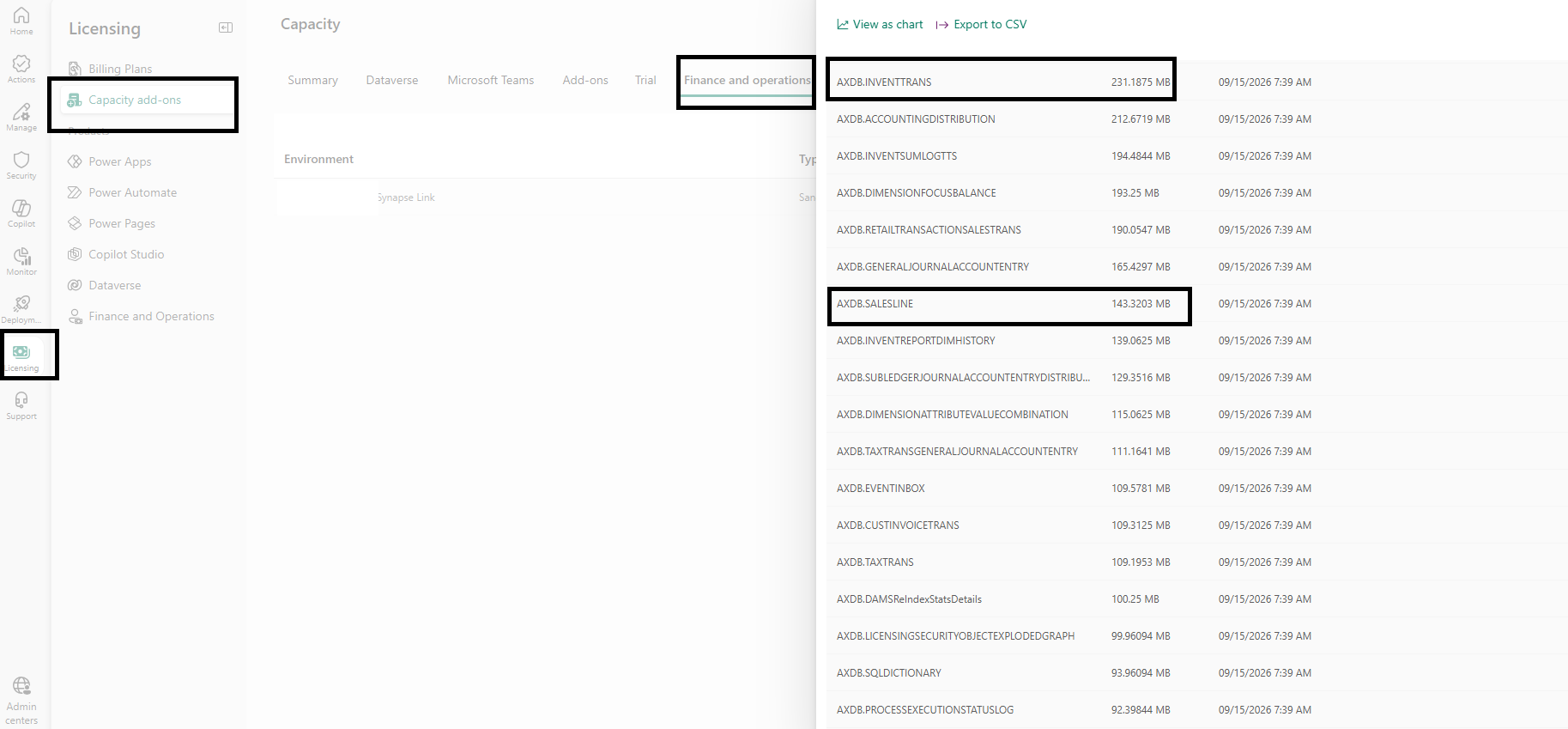
F&O tables appear with an AXDB. prefix in upper case. To join the two lists, strip the prefix and lower-case the name: AXDB.INVENTTRANS on the F&O tab is inventtrans-Analytics on the Dataverse tab. Data-entity-backed tables carry an mserp_ prefix on the Dataverse side — mserp_saleslinebientity-Analytics, mserp_purchlinebientity-Analytics — and have no single AXDB. counterpart, so exclude them from ratio calculations rather than guessing at a match.
With both CSVs exported you can compute the replica ratio per table yourself, which is the input to every decision in the rest of this post.
#Measured replica ratios
The compression ratio of the replica is not documented. The following figures were measured on a Dynamics 365 Finance and Operations sandbox, joining the two exports above — F&O source table size against the size of the Dataverse analytics replica the same table produced:
| Table | Source size (MB) | Analytics replica (MB) | Replica as % of source |
|---|---|---|---|
AXDB.INVENTTRANS |
231.2 | 24.0 | ~10% |
| Large batch history table | 1,504.4 | 160.5 | ~11% |
AXDB.SALESLINE |
143.3 | 16.9 | ~12% |
| Small sales header table | 2.0 | 1.3 | ~65% |
Two observations follow from this data.
For large tables, budget roughly 10–12% of source size. Delta Parquet's columnar compression is effective at this scale. A terabyte of F&O tables lands in the region of 100–120 GB of Dataverse database capacity.
For small tables, the ratio degrades significantly. The 2 MB table produced a 1.3 MB replica — 65%, not 10%. Compression has limited data to work with, and the fixed overhead of Delta file and transaction-log structures becomes proportionally dominant. Below a certain table size, most of the consumption is structural rather than data.
The operational consequence is that selection discipline should be applied to the low-volume tables, not only the high-volume ones. A few hundred small tables syncing at a near-1:1 ratio can represent meaningful consumption for data that is never queried. Per-table selection has more effect than total source volume.
Measure your own ratios before you extrapolate — these are from one sandbox, and yours will differ with column count, data types, and churn.
#What Dataverse storage costs
This is the component worth modelling, because the rate is roughly three orders of magnitude above lake storage. Microsoft publishes the pay-as-you-go meters on Learn:
| Dataverse storage category | Included per pay-as-you-go environment | Price above the entitlement |
|---|---|---|
Database — where -Analytics replicas land |
1 GB | $48 per GB/month |
| File | 1 GB | $2.40 per GB/month |
| Log (only if auditing is on) | none | $12 per GB/month |
Source: Pay-as-you-go meters.
Fabric Link replicas land in database storage — the $48 line. That is the number to hold in mind for the rest of this post.
For comparison, the same Delta Parquet held elsewhere:
| Storage | Price per GB per month |
|---|---|
| OneLake — cold | $0.0050 |
| OneLake — cool | $0.0125 |
| OneLake — hot | $0.023 |
| Fabric SQL storage | $0.25 |
| Dataverse database | $48 |
The practical reading of that table is that OneLake storage is not worth modelling and Dataverse database storage is. A 50 GB replica is $1.15/month in OneLake hot and $2,400/month as Dataverse database consumption. Any cost work on a Fabric link should be spent entirely on reducing the number of gigabytes sitting in that $48 row.
#The Fabric capacity component
This component is publicly priced. Capacity is sold in CUs:
| SKU | CUs | Pay-as-you-go | 1-year reservation |
|---|---|---|---|
| F2 | 2 | $262.80/mo | $156.33/mo |
| F4 | 4 | $525.60/mo | $312.67/mo |
| F8 | 8 | $1,051.20/mo | $625.33/mo |
| F16 | 16 | $2,102.40/mo | $1,250.67/mo |
| F32 | 32 | $4,204.80/mo | $2,501.33/mo |
| F64 | 64 | $8,409.60/mo | $5,002.67/mo |
| F128 | 128 | $16,819.20/mo | $10,005.33/mo |
| F256 | 256 | $33,638.40/mo | $20,010.67/mo |
Reservation saves roughly 41% over pay-as-you-go. SKUs now run up to F4096 and F8192.
#The cost that isn't on either invoice
The storage premium buys something the alternatives don't include: Microsoft owns the pipeline.
With Synapse Link to a storage account, or any hand-built export, you own the extraction: the pipeline definition, the incremental watermark logic, the schema-drift handling when a column is added upstream, the failure alerting, the retry behaviour, the on-call rota when a sync breaks before month-end close, and the conversion job that turns landed files into queryable Delta. That is a standing engineering commitment, not a one-off build.
Link to Fabric has no pipeline to author or maintain. Table selection is a configuration surface, the sync is a managed service, and schema changes propagate without you writing anything. There is no orchestration to monitor and no conversion step to keep running.
So the comparison isn't $48/GB against $0.023/GB. It's $48/GB against $0.023/GB plus a pipeline and the engineer-time to keep it alive.
#Cost levers, ranked by impact
1. Unselect tables that aren't queried. This has the largest effect on the storage component. Open Manage tables from the command bar on your Fabric link, clear the tables, and confirm. Unselected tables are removed from the internal storage that feeds the shortcuts, so consumption stops. Removing a table doesn't delete anything in Dataverse; it removes the OneLake shortcut and stops the sync. Some system tables and add-in-required tables can't be removed.
2. Audit the small-table long tail. Per the ratios above, low-volume tables consume proportionally more. Sort the capacity CSV by replica-size-to-source-size rather than by absolute size.
3. Avoid unnecessary relinks. Unlink-and-relink triggers a full initial sync of every configured table. That's a large, concentrated compute event. Batch your reasons for relinking rather than doing it repeatedly.
#A worked example
An F&O estate with 500 GB of candidate tables, of which you actually need 150 GB for operational reporting:
| Approach | Dataverse replica | Monthly database storage at $48/GB |
|---|---|---|
| Link everything (500 GB) | ~55 GB at 11% | ~$2,592 above the 1 GB entitlement |
| Link selectively (150 GB) | ~17 GB at 11% | ~$768 above the 1 GB entitlement |
| Selective + prune small-table tail | ~12 GB | ~$528 above the 1 GB entitlement |
The difference between the first and third rows is roughly $2,060/month in storage consumption alone — from table selection, with no change to the data anyone actually queries. Note that the default behaviour of Link to Fabric is to add all non-system change-tracked tables, which corresponds to the first row.
#Summary & takeaways
- Fabric Link's cost is Dataverse database capacity + Fabric capacity.
- Find replica consumption per table in PPAC → Licensing → Dataverse → Environments → Consumption per table, filtered on the
-Analyticssuffix. Get the matching source sizes from Capacity add-ons → Finance and operations, where tables carry anAXDB.prefix. - Budget ~10–12% of source size for large tables. For small tables the ratio can reach 65%, so the long tail consumes proportionally more.
- Dataverse database storage is $48/GB/month above a 1 GB per-environment entitlement.
- The premium buys away the pipeline you would otherwise build and maintain. Weigh it against engineer-time, not against the raw per-GB rate.
- The largest storage lever is unselecting tables via Manage tables. Enable CDF only where it's consumed; it costs storage, compute, and latency.
- Fabric capacity reservation saves ~41%, but not on Autoscale Billing for Spark or capacity overage.
#Sources
- Microsoft Fabric pricing — F SKU pay-as-you-go and reservation rates, ~41% reservation saving, OneLake hot/cool/cold storage rates, SQL storage rates, and the note that Autoscale Billing for Spark and capacity overage bill at pay-as-you-go rates without reservation discounts. Checked 14 September 2026.
- Pay-as-you-go meters — the published Dataverse storage rates ($48/GB/month database, $2.40 file, $12 log), the 1 GB per-environment database and file entitlements, the absence of a log entitlement, and the daily-snapshot billing method. Checked 14 September 2026.
- Dataverse capacity-based storage details — the capacity report structure,
- Analyticstables, cross capacity-type borrowing (Database → Log → File), the combined Dataverse and Operations database pool, overage enforcement scenarios, and the storage advisor preview. - Link your Dataverse environment to Microsoft Fabric — confirmation that Link to Fabric creates a Delta Parquet replica using Dataverse storage and increases Dataverse database storage consumption, and where to view it in the admin center.
- Configure your environment and link to Microsoft Fabric — the Manage tables surface, the fact that only selected tables consume storage, removal behaviour, Change Data Feed's ~24-hour retention and its performance tradeoff, and the region requirement.
- Capacity add-ons for Power Apps and Power Automate — how Dataverse storage add-ons accrue to tenant-level entitlements, and the licensing guide as the authoritative source for per-GB pricing.
#Related reading
- Azure Synapse Link Delta Lake Is Being Retired — the deprecation timeline that forces this decision, and how Fabric Link compares with Synapse Link CSV on everything other than cost.
- Implementing Change Data Feed for Incremental Processing in Microsoft Fabric Lakehouses — worth reading before you enable CDF on a Fabric link, so you enable it for a reason.
Get future articles
Follow for practical Microsoft Fabric, Azure, Spark, and data engineering writeups.