GENERATED BY DEFAULT vs GENERATED ALWAYS in Databricks
When defining identity columns in Databricks tables, two common options for automatic identity value generation are GENERATED BY DEFAULT and GENERATED ALWAYS. This article explains the differences and when to use each.
When defining identity columns in Databricks table, two common options for automatic identity value generation are GENERATED BY DEFAULT and GENERATED ALWAYS. Both relate to how the system generates unique values for a column, typically used for unique identifiers or surrogate key for a table.
#GENERATED ALWAYS AS IDENTITY
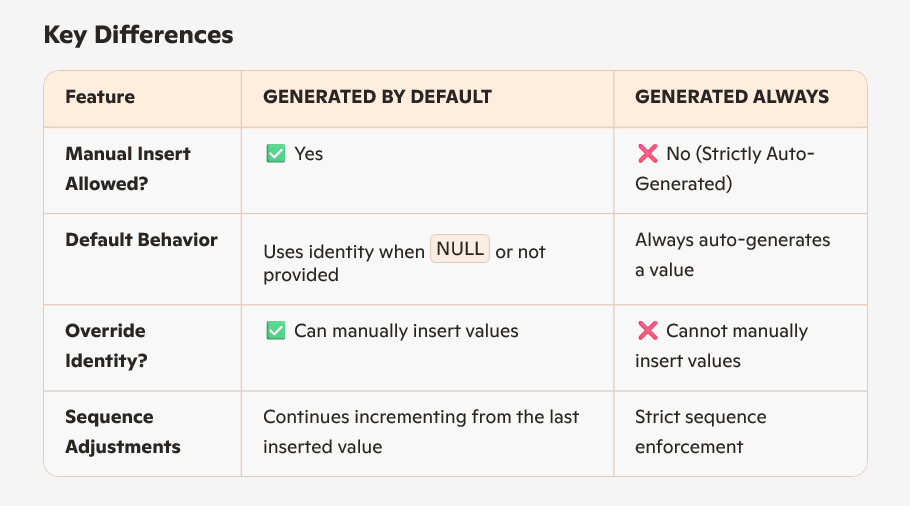
The database always generates a value for the identity column.
You cannot explicitly insert or update a value in this column. Attempts to provide a value will result in an error. This ensures strict control over the identity values, preventing manual overrides.
CREATE TABLE example_always (
    id INT GENERATED ALWAYS AS IDENTITY PRIMARY KEY,
    data TEXT
);

INSERT INTO example_always (data) VALUES ('A'), ('B');  -- id auto-generated
-- INSERT INTO example_always (id, data) VALUES (5, 'C'); -- ERROR
#GENERATED BY DEFAULT AS IDENTITY
The database generates a value only if no explicit value is provided during insertion.
If you supply a value for the identity column, the database uses that value instead of generating one. This offers flexibility to override the sequence when necessary.
CREATE TABLE example_default (
    id INT GENERATED BY DEFAULT AS IDENTITY PRIMARY KEY,
    data TEXT
);

INSERT INTO example_default (data) VALUES ('A'), ('B');  -- id auto-generated
INSERT INTO example_default (id, data) VALUES (5, 'C'); -- id explicitly set to 5
#Using ALTER COLUMN id SYNC IDENTITY
When you manually insert or update identity column values with GENERATED BY DEFAULT, the underlying sequence that generates new identity values can become out of sync with the actual maximum value in the table. This can cause conflicts or errors on subsequent inserts.
ALTER TABLE table_name ALTER COLUMN id SYNC IDENTITY;
is used to synchronize the sequence generator with the current maximum value of the identity column. This resets the sequence so that the next generated value will be greater than the existing maximum, preventing conflicts.
#Summary
- GENERATED ALWAYS AS IDENTITY: System always generates the value; manual inserts/updates to the identity column are disallowed. Use for strict auto-increment control.
- GENERATED BY DEFAULT AS IDENTITY: System generates a value only if none is provided; manual inserts/updates allowed. Use for flexibility in data management.
- ALTER COLUMN … SYNC IDENTITY: Use this to realign the identity sequence with the current max value after manual changes to identity column data.
This distinction helps database designers choose the right identity generation strategy based on application needs, balancing control and flexibility.
Get future articles
Follow for practical Microsoft Fabric, Azure, Spark, and data engineering writeups.