How to Use Concurrent Sessions in Fabric Data Pipelines
Speed up your Fabric pipelines by running notebooks in parallel — without breaking your Spark cluster. Learn how High Concurrency Mode works and how to configure session tags.
Speed up your Fabric pipelines by running notebooks in parallel — without breaking your Spark cluster.
#Why Concurrent Sessions Matter
When you run multiple notebooks in a Fabric pipeline, the default behavior is sequential execution and a new session for each notebook run. This means more execution time of notebook.
Concurrent sessions let you run multiple notebooks in parallel on the same Spark cluster. This reduces total runtime and improves resource utilization.
#How It Works
When High Concurrency Mode is enabled:
- Fabric packs multiple notebooks into a single Spark session.
- Each notebook runs in its own REPL core, so variables don't clash.
- You save time because the session is already running.
#Conditions for Session Sharing
To share a Spark session, notebooks must:
- Be run by the same user.
- Be in the same workspace.
- Have the same default Lakehouse (or none at all).
- Use the same Spark compute configuration.
#1. Enable High Concurrency in Workspace Settings
- Go to Workspace Settings → Data Engineering/Science → Spark Settings → High Concurrency.
- Turn on For pipeline running multiple notebooks.
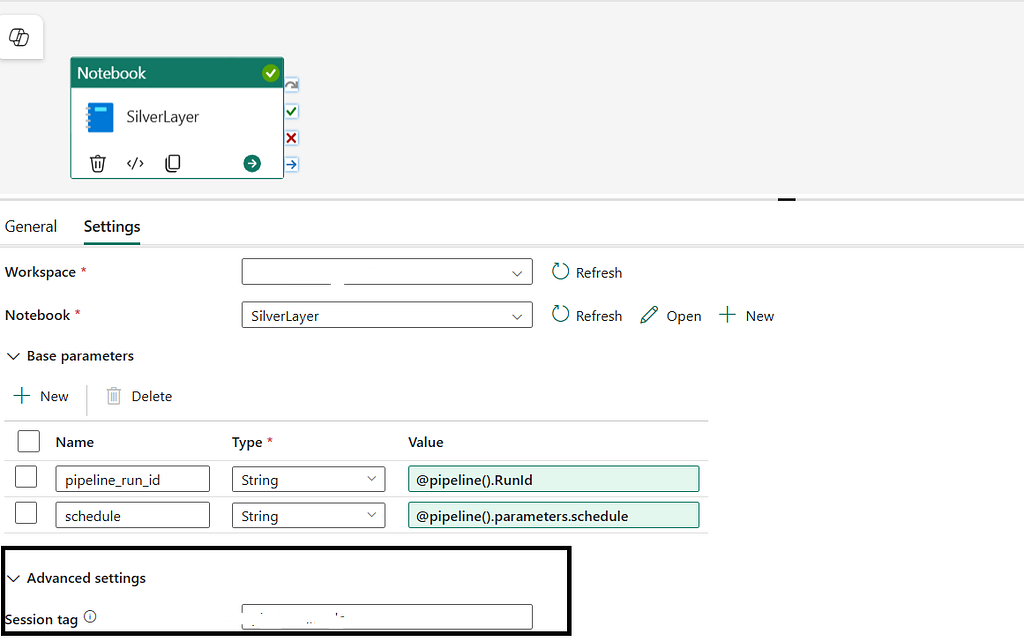
#2. Add a Session Tag in Pipeline Activities
- In your Data Pipeline, add multiple Notebook activities.
- For each activity, go to Advanced Settings → Session Tag.
- Use the same tag (e.g.,
customer-segment-run) for all notebooks you want to share the session.
Tip
A single high-concurrency session can handle up to 5 notebooks per tag. If you add more, Fabric automatically creates a new session for load balancing.
Get future articles
Follow for practical Microsoft Fabric, Azure, Spark, and data engineering writeups.