How Microsoft Fabric Mirroring Works for Azure SQL Database — A Technical Deep Dive
Introduction When building a modern lakehouse on Microsoft Fabric, one of the most powerful — and often underexplored — features is Mirrored Databases. Instead of...
#Introduction
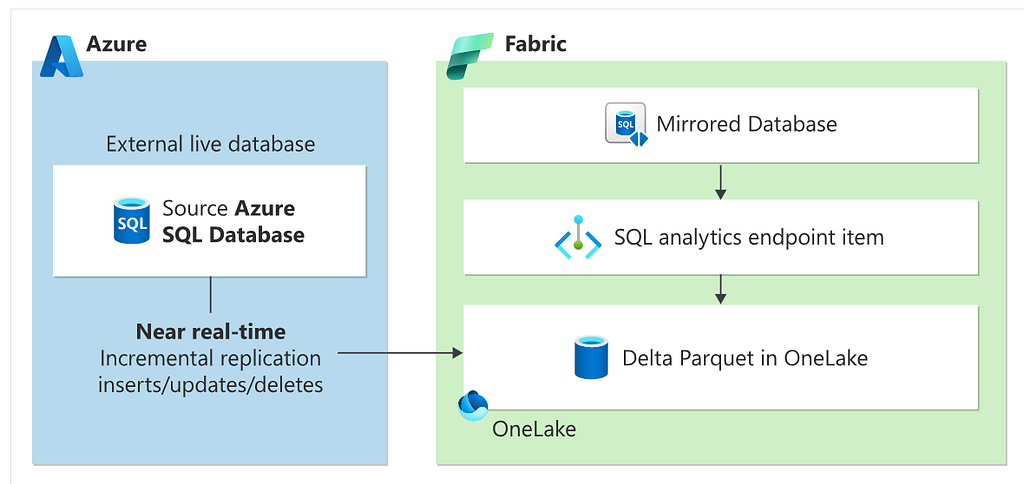
When building a modern lakehouse on Microsoft Fabric, one of the most powerful — and often underexplored — features is Mirrored Databases. Instead of writing ETL pipelines to copy data from your operational database into the lakehouse, mirroring keeps a near real-time replica of your source database directly in OneLake as Delta Parquet files. Zero pipelines. Zero custom connectors. Just live data.
#What is a Mirrored Database?
A Mirrored Database in Microsoft Fabric is a managed replication service that continuously syncs data from a supported source (Azure SQL Database, Snowflake, Azure Cosmos DB, and others) into your Fabric workspace as Delta tables stored in OneLake.
Under the hood, Fabric uses Change Data Capture (CDC) on Azure SQL Database to track inserts, updates, and deletes, and applies those changes to the Delta table replica. The result is a low-latency read copy of your operational data that you can query from any Fabric item — notebooks, warehouses, pipelines, or Power BI directly.
#The Core Mechanism: Change Data Capture (CDC)
When you configure mirroring on an Azure SQL Database, Fabric does not poll your tables on a schedule. Instead, it uses Change Data Capture (CDC) — a SQL Server feature that reads directly from the database transaction log.
Here is what happens at the database level:
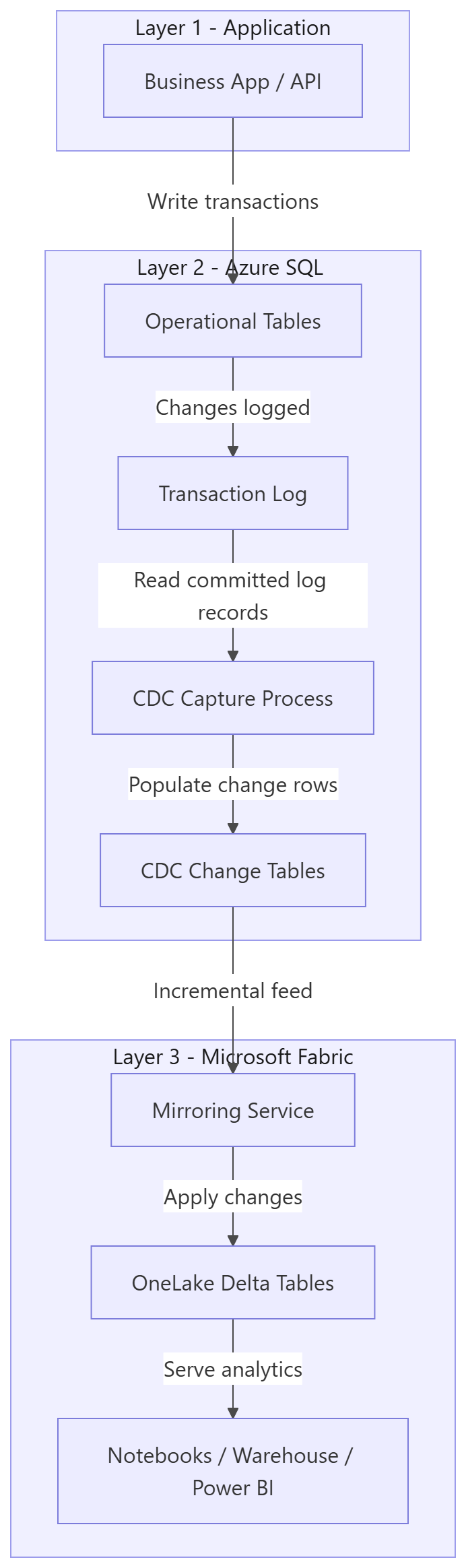
When a row is inserted, updated, or deleted in a monitored table, SQL Server writes that operation to the transaction log as it normally would. CDC’s capture process reads the log asynchronously and writes the before/after row images into hidden system change tables (named cdc.{schema}_{table}_CT). Fabric's mirroring service then reads from those change tables and applies them to the Delta table replica in OneLake.
The important implication: this is not a snapshot copy. It is a continuous, log-based stream of changes. Latency is typically in the range of a few seconds to a few minutes, depending on transaction volume and Fabric capacity load.
When you first activate mirroring on a table, Fabric automatically enables CDC on both the source database and the specific table via the connection. You do not need to run sp_cdc_enable_db or sp_cdc_enable_table yourself. Fabric handles this as part of the initial setup.
#The Initial Snapshot
Before CDC takes over, Fabric needs a baseline. When you first mirror a table, it runs a full initial snapshot — a bulk read of the entire table using a consistent transaction snapshot. This is equivalent to a SELECT * at a point in time.
The snapshot is streamed into OneLake and written as the first version of the Delta table. Once the snapshot completes, CDC replication begins from the log position that corresponds to the snapshot’s transaction timestamp — ensuring no changes are missed during the initial load.
For large tables (hundreds of millions of rows), this initial snapshot can take hours.
#Mirrored Database in Git: File Structure Explained
A Microsoft Fabric Mirrored Database can be fully represented in source control with 2 files:
  <database-name>.MirroredDatabase/
    .platform
    mirroring.json
#1) .platform (item identity file)
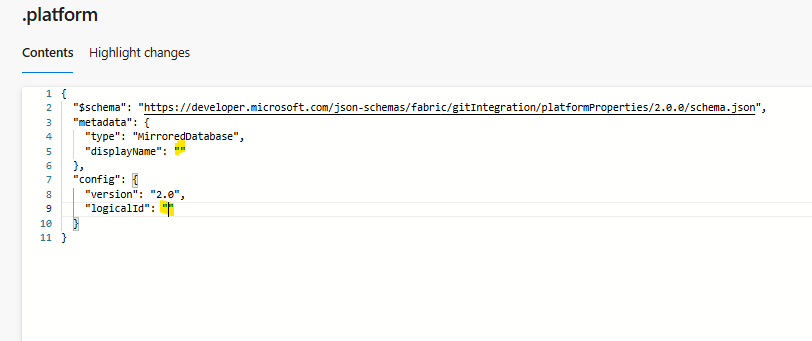
This file defines the Fabric item metadata. This file is the “identity card” of the mirrored database item.
What it contains:
- metadata.type: must be MirroredDatabase
- metadata.displayName: friendly name shown in Fabric
- config.logicalId: stable GUID used by Fabric Git integration to track the same item across deployments
#2) mirroring.json (technical behavior file)
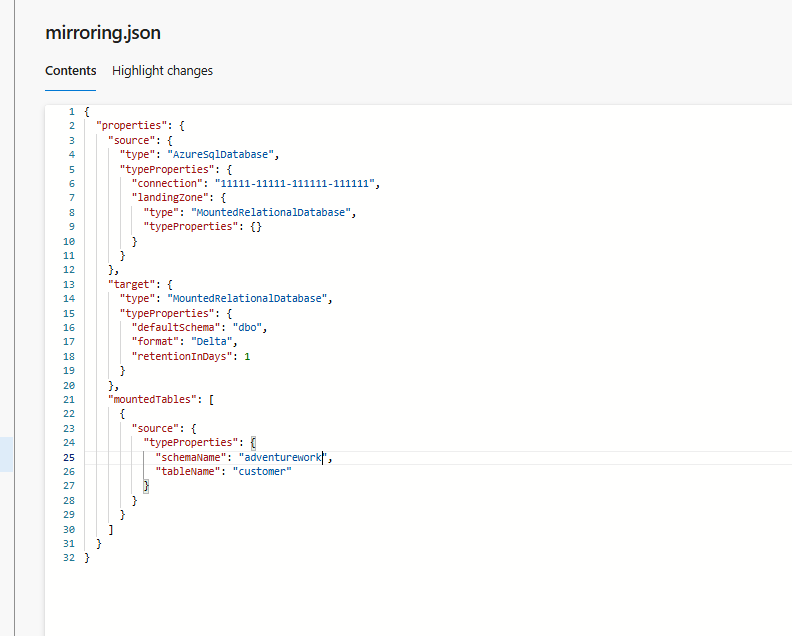
This is the core mirror definition.New table onboarding means adding one more object in mountedTables.Because this file is in Git, every table addition is auditable in PR diffs.
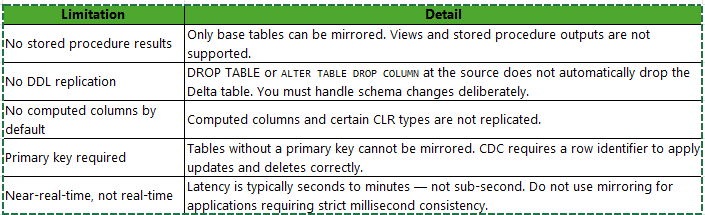
#What Mirroring Does NOT Do
#Key Takeaways
- Fabric mirroring uses CDC on the SQL Server transaction log — it is log-based streaming replication, not polling.
- Fabric auto-enables CDC — you do not configure it manually, but your source database must meet the tier and permission requirements.
- The initial snapshot is a full table copy before CDC kicks in — budget time for large tables.
- Data lands in Delta Lake format in OneLake, giving you ACID reads, schema evolution, and time travel out of the box.
- mountedTables is your explicit allowlist — add an entry, redeploy, and Fabric starts replicating that table automatically.
- Tables must have a primary key to be mirrorable.