Implementing Change Data Feed for Incremental Processing in Microsoft Fabric Lakehouses
Most lakehouse pipelines are still doing one expensive thing repeatedly: reprocessing entire tables, even when only a tiny fraction of rows has changed. This post explains the CDF-driven load pattern, why it works, where it can hurt, and how to implement it safely in Microsoft Fabric.

Most lakehouse pipelines are still doing one expensive thing repeatedly: reprocessing entire tables, even when only a tiny fraction of rows has changed.
As data volumes grow, this approach becomes slow, costly, and operationally risky — especially when source systems frequently update or delete existing records.
To solve this, we implemented a Change Data Feed (CDF)–driven load pattern:
Delta table (CDF enabled) → read only incremental changes → merge into target table (Silver / Gold) → update watermark
This post explains the pattern, why it works, where it can hurt, and how to implement it safely in Microsoft Fabric.
#What Is Change Data Feed (CDF)?
Change Data Feed (CDF) is a Delta Lake feature that records row-level changes made to a table, instead of forcing you to re-read the full table every time.
When enabled, CDF captures events such as:
- Insert — new rows added
- Update — row changes (before/after images depending on engine behavior)
- Delete — rows removed
You can find more details in the official Delta Lake documentation.
#Architecture Overview
At a high level, the pipeline works as follows:
- Tables are stored as managed Delta tables with CDF enabled
- A watermark table tracks the last processed commit per source
- Fabric notebooks read only CDF changes using commit versions
- MERGE logic applies deterministic updates to target tables

#Step 1: Enable CDF
CDF (Change Data Feed) records row-level changes in a Delta table so you can query inserts, updates, and deletes incrementally.
ALTER TABLE dbo.products SET TBLPROPERTIES (delta.enableChangeDataFeed = true);
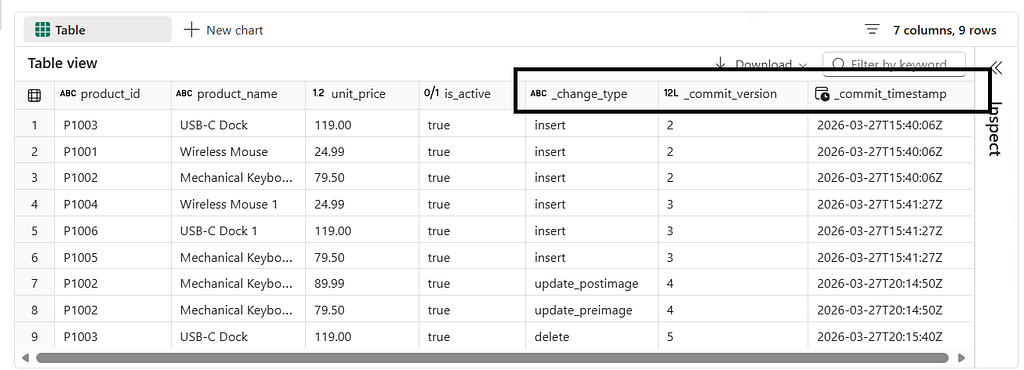
Once CDF is enabled, you can inspect versioned changes using:
SELECT
    product_id,
    product_name,
    unit_price,
    is_active,
    _change_type,
    _commit_version,
    _commit_timestamp
FROM table_changes('dbo.products', 1)
ORDER BY _commit_version, _change_type;
#Step 2: Create a Watermark Table
To process changes incrementally, the pipeline must remember how far it has already processed.
CREATE TABLE IF NOT EXISTS control.cdf_watermark (
    source_table STRING,
    last_commit_version BIGINT,
    last_commit_timestamp TIMESTAMP,
    updated_at TIMESTAMP
) USING DELTA;
This table acts as the state store for your pipeline.
#Step 3: Read Changes Incrementally
This is where the real compute savings come from.
Only changes after the last processed commit version are read.
source_table = "dbo.products"
wm_table = "control.cdf_watermark"

wm_df = spark.table(wm_table).filter(f"source_table = '{source_table}'")
last_version = wm_df.select("last_commit_version").first()
start_version = 0 if last_version is None else last_version[0] + 1

changes_df = (
    spark.read.format("delta")
    .option("readChangeFeed", "true")
    .option("startingVersion", start_version)
    .table(source_table)
)
Using commit versions instead of timestamps guarantees correct ordering and avoids issues with late‑arriving or out‑of‑order records.
#Step 4: Apply Merge Semantics in Target Table
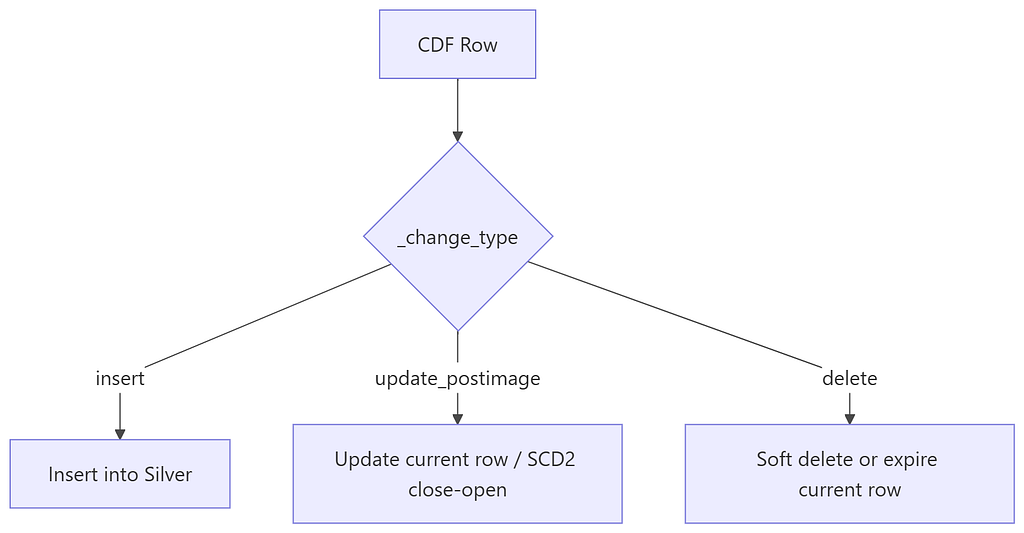
Maps each change type into deterministic target table behavior.
- insert → insert new current row.
- update_postimage → update (Type 1) or close/open row (Type 2).
- delete → mark
_is_deleted=trueand_is_current=falsefor lineage and auditability.
#Step 5: Update Watermark Only After Success
The watermark must be updated only after the target table merge completes successfully.
MERGE INTO control.cdf_watermark AS t
USING (
    SELECT
        'dbo.products' AS source_table,
        12345 AS last_commit_version,
        current_timestamp() AS last_commit_timestamp,
        current_timestamp() AS updated_at
) s
ON t.source_table = s.source_table
WHEN MATCHED THEN UPDATE SET *
WHEN NOT MATCHED THEN INSERT *;
#When to Use CDF
1. Your source data mutates frequently If rows get updated or deleted regularly (order statuses, employee records, pricing tables, inventory), CDF is the most reliable way to capture those transitions correctly.
2. Your tables are large and growing When full table scans become expensive, processing only changed rows gives significant compute and cost savings.
3. You need to track deletes CDF is one of the few patterns that lets you detect and handle deletes explicitly in Silver/Gold layer. Without it, you typically never know a row was removed from source.
4. You run pipelines frequently (near real-time or hourly) The faster your pipeline runs, the more wasteful full snapshots become. CDF shines in high-frequency schedules.
#When to Avoid CDF
1. Your table is small and append-only If a table only gets new rows and has fewer than a few hundred thousand rows, a full reload is often simpler and fast enough. The operational overhead of CDF is not worth it.
2. You use shortcuts to external/mirrored sources you don't own CDF requires write access to set TBLPROPERTIES. If your Bronze table is a read-only shortcut to a mirrored database, you cannot enable CDF directly. You need an intermediate managed copy.
3. Source data has no reliable primary key If you cannot reliably match incoming changes to existing records, merge semantics break down. CDF without a stable business key produces incorrect results.