Swap Fabric Pipeline Connections per Environment with Variable Libraries
A Data Pipeline references a connection, not a string — and that connection has a different ID in every workspace. Here's how the Connection Reference variable type swaps it per environment.
Basic Variable Library types swap strings like Key Vault names between DEV, ACC, and PRD. But a Data Pipeline references a connection, and a connection has a different ID in every workspace. The Connection Reference variable type points one pipeline at the right connection per environment, with zero edits to the pipeline itself.
This is the hands-on follow-up to Managing Environment Configs in Microsoft Fabric with Variable Libraries and fabric-cicd, which flagged the advanced (preview) variable types for a dedicated writeup. Here it is.
#The problem: a connection ID is environment-specific
You have a Data Pipeline that connects to an external SFTP file drop, lists the files, and copies each CSV into your Bronze Lakehouse.
The SFTP endpoint for DEV isn't the same host as PRD. The connection is a separate Fabric object in each environment, so it has a different connection ID in DEV, ACC, and PRD.
If you hard-code the connection into the pipeline, the pipeline in PRD still points at the DEV connection ID after deployment — so it reads the wrong source, or fails outright because that ID doesn't exist in the PRD workspace.
If you deploy with fabric-cicd, you can patch this with a parameter.yml find-and-replace that rewrites the connection GUID per environment at deploy time. It works.
Fabric has a cleaner, built-in answer: treat the connection as a variable. Define it once, override its ID per environment, and let the pipeline read whichever one is active — no GUID rewriting, and the source stays identical to what's deployed.
#The Connection Reference variable type
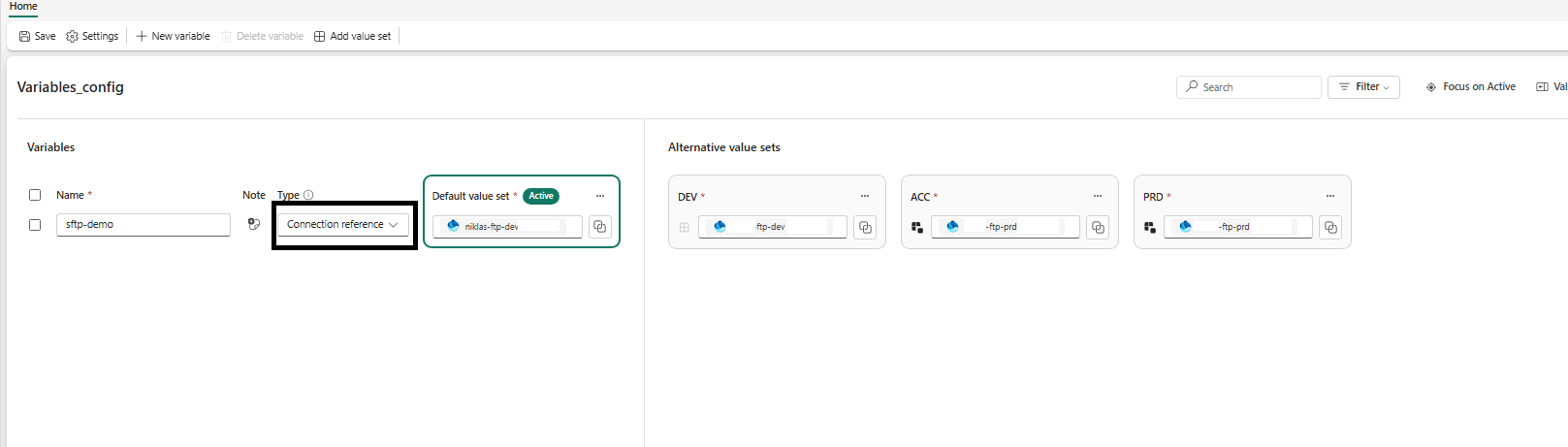
A Connection Reference is one of the two advanced Variable Library types (alongside Item Reference). Instead of storing a plain string, it stores a connection ID — a pointer to an external data connection (SFTP, Azure SQL, Snowflake, and so on). A consuming item references the variable, not the raw ID, so the ID can differ per environment without the item ever changing.
Important
Connection Reference is currently a preview variable type. The disk format and behavior below are stable enough to build on, but treat it as preview when planning production rollouts.
On disk, a Variable Library is four kinds of files:
PlatformConfig.VariableLibrary/
├── variables.json          # variable definitions + default values
├── settings.json           # value set ordering
├── .platform               # auto-generated Fabric metadata
└── valueSets/
    ├── DEV.json             # DEV overrides
    ├── ACC.json             # ACC overrides
    └── PRD.json             # PRD overrides
#variables.json — define the connection variable
Add a variable of type ConnectionReference. Its default value is an object with a single connectionId. Here it lives alongside a couple of ordinary string variables so you can see how it fits in:
{
  "$schema": "https://developer.microsoft.com/json-schemas/fabric/item/variableLibrary/definition/variables/1.0.0/schema.json",
  "variables": [
    {
      "name": "env",
      "type": "String",
      "value": "dev",
      "note": "Environment short code (dev/acc/prd)."
    },
    {
      "name": "sftp-source",
      "type": "ConnectionReference",
      "value": {
        "connectionId": "1111aaaa-1111-2222-3333-444455556666"
      },
      "note": "External SFTP connection the Bronze copy pipeline reads from."
    }
  ]
}
The default value here is the DEV connection ID. That's a deliberate, useful convention: DEV inherits the default, and only the other environments need an override.
#valueSets/*.json — override the connection per environment
A value set only lists the variables it needs to change; anything it doesn't mention falls back to the default in variables.json.
Because the default already points at DEV, DEV.json doesn't need to touch the connection at all:
{
  "$schema": "https://developer.microsoft.com/json-schemas/fabric/item/variableLibrary/definition/valueSet/1.0.0/schema.json",
  "name": "DEV",
  "variableOverrides": [
    { "name": "env", "value": "dev" }
  ]
}
ACC.json and PRD.json override the connection ID with each environment's own connection:
{
  "$schema": "https://developer.microsoft.com/json-schemas/fabric/item/variableLibrary/definition/valueSet/1.0.0/schema.json",
  "name": "PRD",
  "variableOverrides": [
    { "name": "env", "value": "prd" },
    {
      "name": "sftp-source",
      "value": { "connectionId": "9999ffff-9999-8888-7777-666655554444" }
    }
  ]
}
#settings.json — declare the value set order
{
  "$schema": "https://developer.microsoft.com/json-schemas/fabric/item/variableLibrary/definition/settings/1.0.0/schema.json",
  "valueSetsOrder": ["DEV", "ACC", "PRD"]
}
Your connection IDs now live in a versioned, reviewable, workspace-native item. "Which connection does PRD use?" is answered by reading valueSets/PRD.json — not by opening the pipeline in three workspaces.
#Wiring the connection variable into a pipeline
This is the part that makes it click. A Data Pipeline references a Variable Library connection in two places:
- A
libraryVariablesblock at the pipeline level that binds the variable into the pipeline. - An expression on each activity that reads
.connectionIdfrom that bound variable.
#1. Bind the variable at the pipeline level
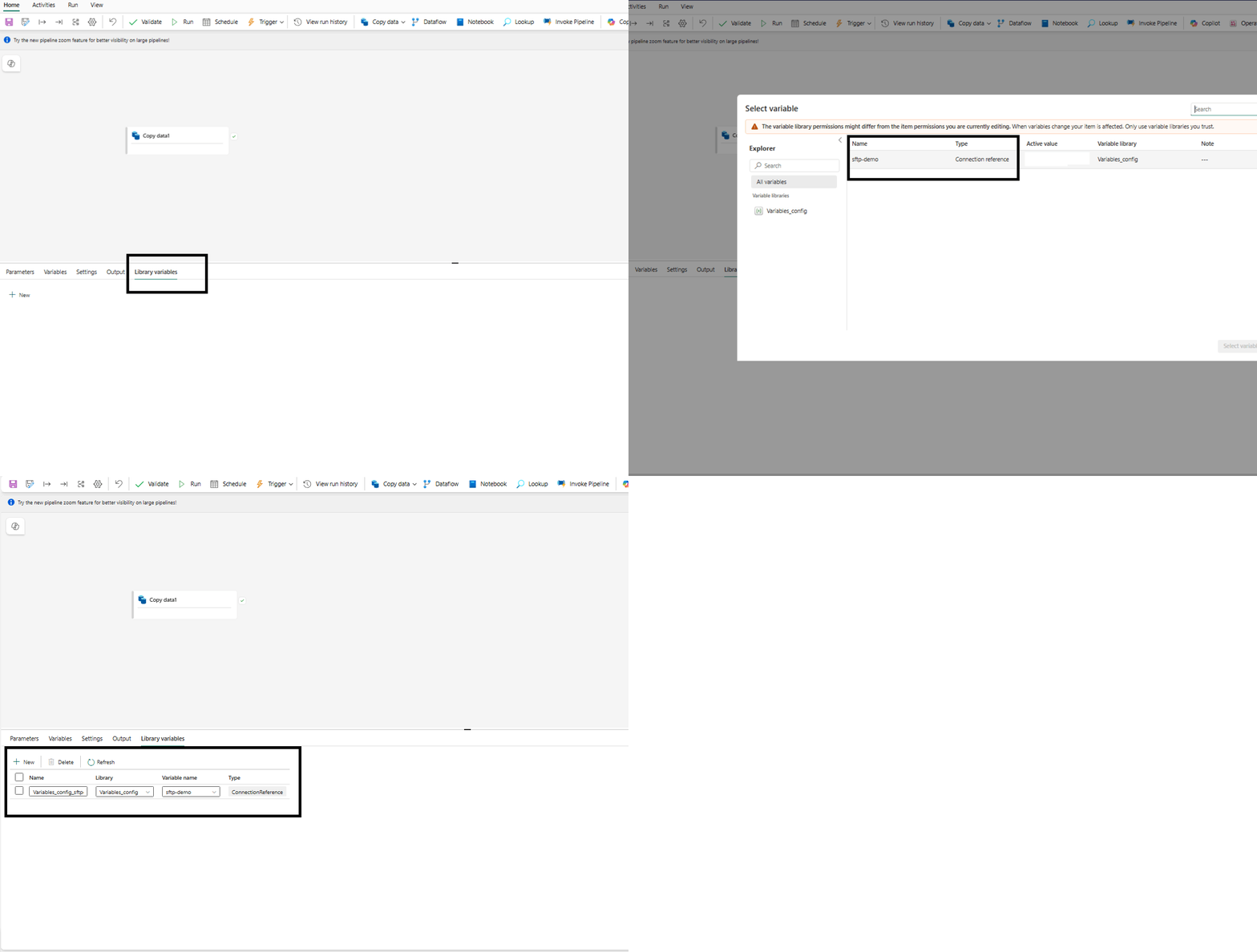
At the bottom of your pipeline-content.json, declare the library variable. The key follows the pattern {libraryName}_{variableName} with dashes stripped — so PlatformConfig + sftp-source becomes PlatformConfig_sftpsource:
"libraryVariables": {
  "PlatformConfig_sftpsource": {
    "type": "Object",
    "variableName": "sftp-source",
    "libraryName": "PlatformConfig"
  }
}
In the pipeline editor this is the Library variables tab, where you add the Variable Library variable and bind it into the pipeline:
#2. Reference it from your activities
Anywhere an activity would normally hard-code a connection, use an externalReferences.connection expression instead. In the UI, open the activity's Source connection dropdown and pick Use dynamic content so you can point it at the bound library variable rather than a fixed connection:
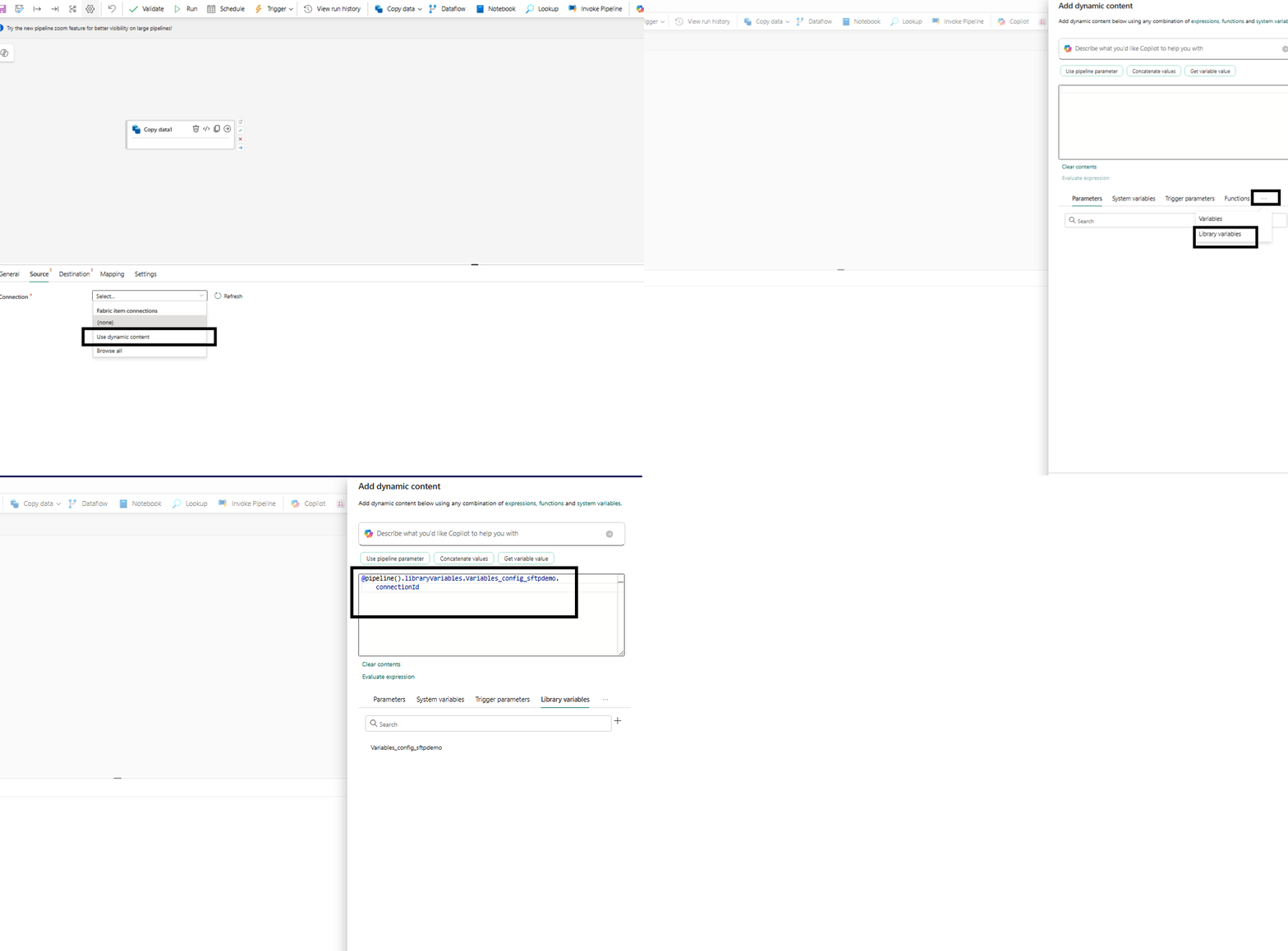
The important line, repeated on every activity that talks to the source, is:
@pipeline().libraryVariables.PlatformConfig_sftpsource.connectionId
That expression resolves to whatever connectionId is in the active value set. The pipeline JSON is identical in DEV, ACC, and PRD. Nothing in it names an environment or a literal connection GUID.
#How the right connection gets picked at deploy time
You don't switch anything by hand. When you deploy the workspace with fabric-cicd and pass environment="PRD", it activates the value set whose name is PRD. From that moment the sftp-source variable resolves to the PRD connection ID, and every pipeline reading PlatformConfig_sftpsource.connectionId picks it up — no pipeline edit, no GUID find-and-replace.
FabricWorkspace(
    workspace_id="<workspace-id>",
    environment="PRD",          # activates valueSets/PRD.json
    repository_directory="./src",
    item_type_in_scope=["DataPipeline", "VariableLibrary", "..."],
    token_credential=AzureCliCredential(),
)
Deploy to DEV → DEV connection. Deploy to ACC → ACC connection. The environment name is the only thing that varies per stage. (The full deployment mechanics are covered in the previous post.)
#Caveats worth knowing
- The connection must already exist in each workspace. A Connection Reference stores an ID; it doesn't create the connection. Create (or share) the SFTP connection in DEV, ACC, and PRD first, then paste each ID into the matching value set. A wrong or missing ID surfaces as a runtime failure, not a deploy-time one.
- Value set names must stay stable. fabric-cicd activates a value set by matching its
nameto yourenvironmentstring. RenamePRDin the Fabric UI and the next deploy can't find it. TreatDEV/ACC/PRDas a contract, not a cosmetic label. - It's still preview. Expect the odd rough edge and keep an eye on the docs before leaning on it in production.
#Wrapping up
Making a pipeline connection environment-aware is four small steps:
- Create the connection in each workspace (DEV, ACC, PRD).
- Add a
ConnectionReferencevariable invariables.json; let the default be your DEV connection. - Override its
connectionIdinvalueSets/ACC.jsonandvalueSets/PRD.json. - Reference it from every activity via
@pipeline().libraryVariables.<Library>_<variable>.connectionId, and bind it in the pipeline'slibraryVariablesblock.
Deploy with FabricWorkspace(environment=...) and the correct connection activates itself. One pipeline, three environments, zero GUIDs in your source.
#Related reading
- Managing Environment Configs in Microsoft Fabric with Variable Libraries and fabric-cicd — the foundation this post builds on: value sets, basic variable types, and how fabric-cicd activates them.
Get future articles
Follow for practical Microsoft Fabric, Azure, Spark, and data engineering writeups.