Managing Environment Configs in Microsoft Fabric with Variable Libraries and fabric-cicd
Variable Libraries plus fabric-cicd's environment parameter give you a versioned, typed way to swap Key Vault names, storage accounts, and other per-environment constants automatically.
A notebook often needs a different Key Vault name in DEV, ACC, and PRD. One option is a find-and-replace token step in the release pipeline. Fabric has a tidier option using variable config.
#The problem: your release pipeline is a string-replacement script
If you've built a data platform on Microsoft Fabric, you've likely run into this: the same notebook or pipeline needs a different Key Vault name, a different storage account, or a different environment label depending on whether it's running in DEV, ACC, or PRD.
A common fix is a find-and-replace step in the release pipeline that swaps kv-myproject-dev for kv-myproject-prd across a set of files right before deployment:
# release-pipeline.yml (the pattern we're trying to kill)
steps:
  - script: |
      find ./src -type f -name "*.py" -exec \
        sed -i "s/__KEYVAULT_NAME__/kv-myproject-$(env)/g" {} +
      find ./src -type f -name "*.py" -exec \
        sed -i "s/__STORAGE_ACCOUNT__/stmyproject$(env)/g" {} +
    displayName: "Inject environment values"
It works, but it's easy to get wrong. A few specific issues with this pattern:
- Source no longer matches what's deployed. The committed notebook has placeholder tokens; the deployed one has real values. Debugging means diffing what's in git against what's actually running.
- Fragile matching. It will happily rewrite a token inside a string literal, a comment, or an unrelated variable name that happens to match.
- No single source of truth. The token → value mapping lives in pipeline YAML, not in the workspace.
- Hard to audit. "What Key Vault does PRD use?" means grepping pipeline scripts, not reading a config file.
Fabric has a first-class answer to this: Variable Libraries for storing environment-specific constants, and fabric-cicd — Microsoft's open-source Python deployment library — to activate the right values automatically at deployment time.
#Variable Libraries: constants as a workspace-native item
A Variable Library is a Fabric item, just like a Notebook or a Lakehouse. It stores named variables and lets each one carry a different value per environment through value sets. One value set is active per workspace at a time, and switching it (manually, via API, or through a deployment pipeline) changes what every consuming item reads — without touching a single line of notebook code.
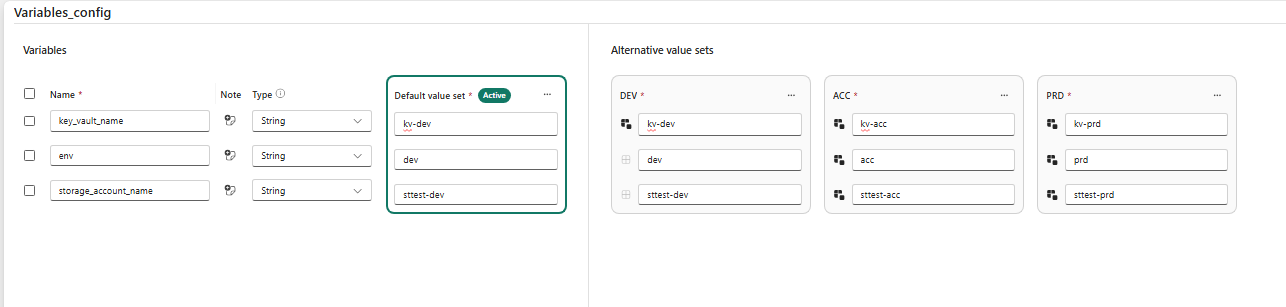
On disk (once the item is Git-connected), a Variable Library is exactly four kinds of files:
MyConfig.VariableLibrary/
├── variables.json          # variable definitions + default values
├── settings.json           # value set ordering
├── .platform               # auto-generated Fabric metadata
└── valueSets/
    ├── DEV.json             # DEV overrides
    ├── ACC.json             # ACC overrides
    └── PRD.json             # PRD overrides
#variables.json — define the variables and their default value set
{
  "$schema": "https://developer.microsoft.com/json-schemas/fabric/item/variableLibrary/definition/variables/1.0.0/schema.json",
  "variables": [
    {
      "name": "key_vault_name",
      "type": "String",
      "value": "kv-myproject-dev",
      "note": "Key Vault holding source-system secrets"
    },
    {
      "name": "storage_account_name",
      "type": "String",
      "value": "stmyprojectdev"
    },
    {
      "name": "env",
      "type": "String",
      "value": "dev"
    }
  ]
}
#valueSets/PRD.json — override per environment
{
  "$schema": "https://developer.microsoft.com/json-schemas/fabric/item/variableLibrary/definition/valueSet/1.0.0/schema.json",
  "name": "PRD",
  "variableOverrides": [
    { "name": "key_vault_name", "value": "kv-myproject-prd" },
    { "name": "storage_account_name", "value": "stmyprojectprd" },
    { "name": "env", "value": "prd" }
  ]
}
A value set only lists the variables it needs to change. Anything not listed falls back to the default in variables.json.
#settings.json — declare the value set order
{
  "$schema": "https://developer.microsoft.com/json-schemas/fabric/item/variableLibrary/definition/settings/1.0.0/schema.json",
  "valueSetsOrder": ["DEV", "ACC", "PRD"]
}
Your constants now live in a versioned, reviewable, workspace-native item instead of being sprinkled through notebooks as placeholder tokens.
#Consuming variables in a notebook
Inside a notebook you read whichever value set is currently active in the workspace — you never branch on environment name in code. Using the notebookutils.variableLibrary API:
import notebookutils

# Reads from whichever value set is currently active in the workspace
myConfig = notebookutils.variableLibrary.getLibrary("MyConfig")

key_vault = myConfig.getVariable("key_vault_name")
storage_account = myConfig.getVariable("storage_account_name")
env = myConfig.getVariable("env")

source_password = notebookutils.credentials.getSecret(
    f"https://{key_vault}.vault.azure.net/",
    "my-source-system-password",
)

print(f"Running in {env}, using vault {key_vault} and storage {storage_account}")
The exact same notebook code runs in every environment. There is no branching on environment name in the code. The only thing that changes is which value set is active — and that's decided at deploy time.
#Where fabric-cicd comes in
fabric-cicd is Microsoft's open-source Python library for deploying Fabric workspace items from source control. VariableLibrary is one of its supported item types, and when you deploy one, you tell fabric-cicd which environment you're targeting — it activates the matching value set automatically.
A minimal deployment script looks like this:
# deploy.py
from azure.identity import AzureCliCredential
from fabric_cicd import FabricWorkspace, publish_all_items

token_credential = AzureCliCredential()

target_workspace = FabricWorkspace(
    workspace_id="your-workspace-id",
    environment="PRD",                # <-- the magic argument
    repository_directory="./src",
    item_type_in_scope=[
        "Notebook",
        "DataPipeline",
        "Environment",
        "VariableLibrary",
    ],
    token_credential=token_credential,  # any azure.core.credentials.TokenCredential
)

publish_all_items(target_workspace)
The environment="PRD" argument does two things:
- It drives fabric-cicd's own
parameter.ymlsubstitutions — thefind_replace/key_value_replace/spark_poolmechanism it uses for values that aren't covered by a Variable Library (workspace-specific lakehouse GUIDs, connection IDs, custom pool bindings, and so on). - For any
VariableLibraryitem in scope, it sets the active value set to whichever value set'snamematches the environment string. This is documented explicitly in fabric-cicd's item type reference: "The active value set of the variable library is defined by theenvironmentfield passed into theFabricWorkspaceobject. If noenvironmentis specified, the active Value Set will not be changed."
So deploying to DEV activates the DEV value set; deploying to ACC activates ACC. Every downstream notebook then transparently reads the right Key Vault, storage account, and environment label — no code change, no token replacement.
Wire it into a pipeline and the environment name is the only thing that varies per stage:
# release-pipeline.yml (the "after")
stages:
  - stage: Deploy_DEV
    jobs:
      - job: publish
        steps:
          - script: python deploy.py --environment DEV
  - stage: Deploy_ACC
    jobs:
      - job: publish
        steps:
          - script: python deploy.py --environment ACC
  - stage: Deploy_PRD
    jobs:
      - job: publish
        steps:
          - script: python deploy.py --environment PRD
#A caveat worth knowing: fabric-cicd can activate a value set, but not rename one
One nuance to keep in mind: fabric-cicd can activate a value set that already exists, but it can't programmatically rename or recreate one. If someone renames or deletes the active value set directly in the Fabric UI after your first deployment, the next automated deploy will fail, because fabric-cicd is looking for a value set whose name matches your environment string and it's no longer there. Recovery is manual: fix the value set name (or recreate it) in the Fabric UI, then re-run the deployment. Keep your value set names (DEV/ACC/PRD, or whatever convention you pick) stable, and treat renaming one as a breaking change to your pipeline rather than a cosmetic edit.
#Why this is better
| Concern | Find-and-replace | Variable Library + fabric-cicd |
|---|---|---|
| Source matches deployed artifact | ❌ placeholders in git | ✅ real, structured values in git |
| Single source of truth | ❌ scattered in pipeline YAML | ✅ one versioned Fabric item |
| Safe substitution | ❌ blind string matching | ✅ typed, named variables |
| Auditability | ❌ grep the scripts | ✅ read valueSets/PRD.json |
| Code branches on environment | Often | ✅ never — code reads the active set |
| Adding a new value | Edit code + pipeline | ✅ add one JSON entry |
environment differences become data, not code changes. A new environment-specific constant is a one-line addition to variables.json plus one line in each value set. Nothing in your notebooks changes.
#In preview: advanced variable types
Basic types (String, Integer, Boolean, DateTime, Guid) cover constants like Key Vault names and cover most of what a typical pipeline needs. Fabric also has two advanced variable types, both currently in preview, that go a step further by pointing at Fabric resources instead of plain strings:
- Item reference — points at another Fabric item (lakehouse, notebook, data pipeline) by storing its Workspace ID + Item ID.
- Connection reference — points at an external data connection (Snowflake, Azure SQL, and so on) by storing its connection ID, so items can reference external sources without embedding connection strings or credentials.
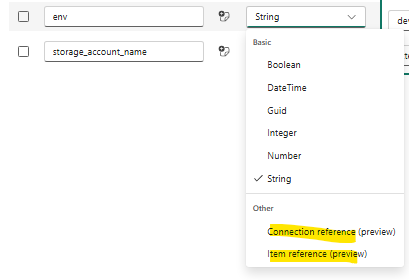
For example, an item reference stores its value as a Workspace ID + Item ID pair:
{
  "name": "MyDataLake",
  "note": "",
  "type": "ItemReference",
  "value": {
    "itemId": "00aa00aa-bb11-cc22-dd33-44ee44ee44ee",
    "workspaceId": "aaaaaaaa-0000-1111-2222-bbbbbbbbbbbb"
  }
}
If you're only swapping strings like Key Vault names and storage accounts, basic variable types are all you need. The advanced types earn their keep once you're parameterizing which lakehouse, notebook, or connection an item points at per stage. Since both are still in preview, I'll cover their end-to-end deployment behavior in a dedicated follow-up post.
#Good candidates for Variable Library variables
- Key Vault name / URI
- Storage account and container names
- Environment label (
dev/acc/prd) for logging and tagging - Connection identifiers and endpoint URLs
- Feature flags and schedule toggles (e.g., enable a pipeline only in PRD)
- Any constant that differs by environment but is not a secret
#Wrapping up
Variable Libraries plus fabric-cicd replace a fragile deployment step with a clean, declarative pattern:
- Define constants once in
variables.json. - Override per environment in
valueSets/*.json. - Deploy with
FabricWorkspace(environment=...)and let fabric-cicd activate the right set. - Read the active variableLibrary set in notebooks with
notebookutils.variableLibrary.getLibrary(...). - If you're parameterizing which lakehouse/notebook/connection an item points to per stage, watch the preview Item Reference and Connection Reference variable types
#Related reading
- Use Key Vault Secrets in Azure Data Factory — the Key Vault access pattern this article assumes: store the vault name as config, fetch secrets at runtime.
- How to Use Concurrent Sessions in Fabric Data Pipelines — another Fabric pipeline pattern worth pairing with a clean CI/CD deployment setup.
- Troubleshooting Fabric Data Pipeline InternalServerError: A Missing Microsoft.Storage Service Endpoint — another deployment-time Fabric gotcha worth knowing before you promote to PRD.
Get future articles
Follow for practical Microsoft Fabric, Azure, Spark, and data engineering writeups.